

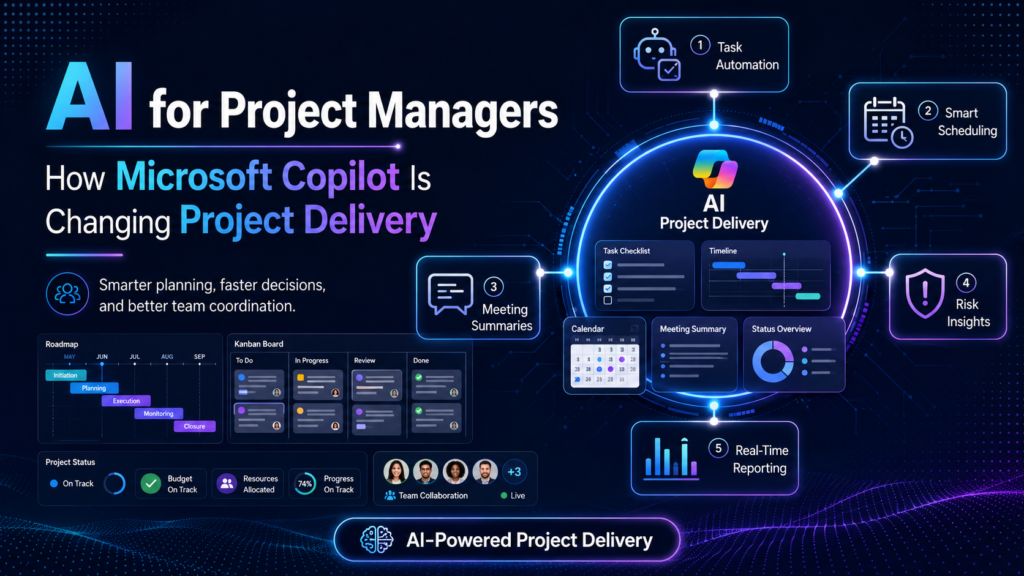
AI for Project Managers is changing delivery by reducing administration and accelerating preparation, analysis and communication. Microsoft Copilot can support work in Microsoft Teams, Word, Excel, PowerPoint, Outlook and Planner, helping project professionals summarise approved information, draft plans, prepare status updates, organise actions and generate first versions of project documents.
The key word is support. Copilot does not own the business case, approve funding, negotiate scope, judge stakeholder commitment or accept risk. A project manager remains accountable for the quality of the plan, the integrity of reporting and the human decisions that move delivery forward. The best use of Copilot is to create more time for leadership, problem-solving and stakeholder engagement.
Why Microsoft Copilot Matters for Project Delivery
Project work lives across emails, meetings, spreadsheets, documents, presentations and task boards. That fragmentation creates manual effort and delays. Microsoft Copilot is useful because it can work within familiar Microsoft 365 workflows and, where licensing and permissions allow, use organisational context the signed-in user is authorised to access. In 2026 Microsoft also made Planner Agent generally available, bringing task and plan management into the Copilot experience and signalling a shift from drafting content toward assisting with operational work.
- Faster preparation: Turn approved briefs and notes into draft agendas, workstreams, questions and document structures.
- Better meeting follow-through: Summarise discussions, surface decisions and propose action lists for participant confirmation.
- Clearer project communication: Translate technical detail into concise updates for sponsors, customers and delivery teams.
- More consistent documentation: Create first drafts of risks, assumptions, decision records, lessons learned and handover content.
- Improved task clarity: Break broad outcomes into candidate tasks, goals and dependencies in Planner for human review.
- Quicker scenario thinking: Explore assumptions and questions before a project manager facilitates the real decision.
How Microsoft Copilot Fits Across the Project Lifecycle
| Lifecycle stage | Copilot assistance | Human accountability | Recommended check |
| Initiation | Summarise approved briefs, draft questions and structure a charter. | Sponsor alignment, feasibility, benefits and authority. | Compare every statement with the approved business case. |
| Planning | Suggest workstreams, tasks, dependencies, assumptions and workshop agendas. | Scope, estimates, sequence, resources and baselines. | Validate with subject-matter experts and delivery teams. |
| Execution | Draft communications, organise actions and support document creation. | Leadership, coordination, quality and issue resolution. | Confirm owners and dates before assignment. |
| Monitoring | Summarise approved data and draft status narratives. | Forecasts, controls, escalation and honest reporting. | Reconcile with source systems and financial records. |
| Closure | Prepare handover, lessons, outstanding actions and closure reports. | Acceptance, benefits transition, records and accountability. | Obtain formal approvals and archive correctly. |
Microsoft Copilot Tools Project Managers Can Use
Copilot in Teams
Can assist users in reviewing meetings and conversations, extracting discussion points and preparing follow-up where meeting, transcription, licence and policy settings allow. Treat suggested actions as drafts until participants confirm them.
Copilot in Word
Useful for structuring project charters, governance plans, communications plans, change requests, closure reports and lessons-learned documents from approved source material.
Copilot in Excel
Can support explanation, formula assistance and analysis of structured project data. Budget and forecast outputs still require reconciliation, controls and independent checking.
Copilot in PowerPoint
Can help transform approved documents into a draft steering committee or stakeholder presentation. Project managers must remove unsupported claims and simplify the story for the specific audience.
Copilot in Outlook
Can summarise long email threads and draft replies. Check the full context before recording an email summary as a decision.
Copilot in Planner
Microsoft support documentation describes prompts for adding tasks, setting goals, planning a day and generating status reports. Planner Agent, generally available in June 2026, extends task and plan management through Copilot, with advanced project-management capabilities expected to evolve over time.
Microsoft Copilot Chat
Useful for brainstorming, drafting and reasoning within the approved enterprise context. Product names, licences and capabilities are changing, so organisations should verify current entitlements before designing a workflow.
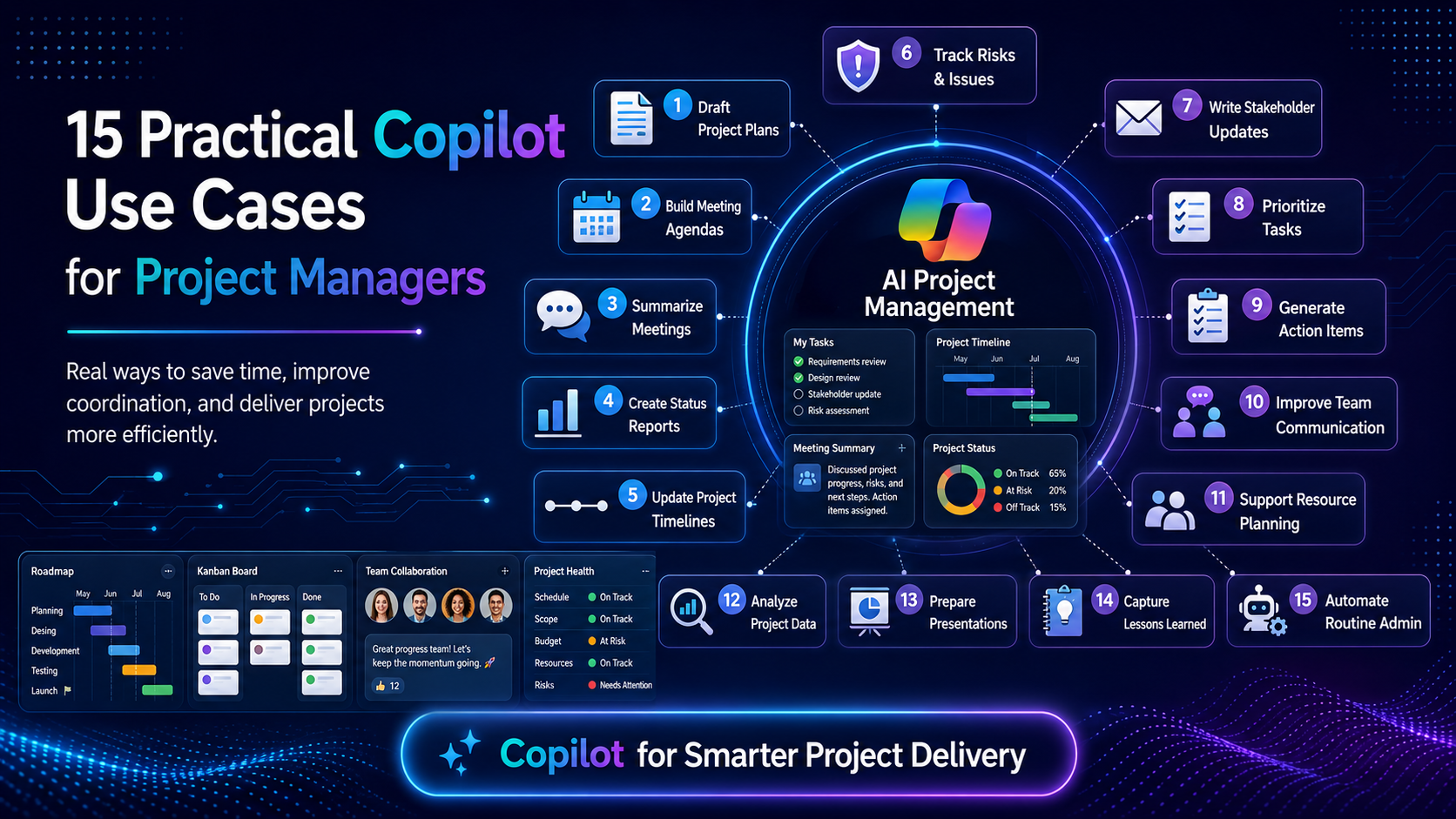
15 Practical Copilot Use Cases for Project Managers
1. Project charter preparation
Summarise an approved business case and create a charter outline covering purpose, objectives, scope, constraints, assumptions, governance and decisions required.
2. Stakeholder mapping
Generate questions for identifying influence, impact, concerns, communication preferences and decision rights. A project manager must validate the map through real conversations.
3. Work breakdown preparation
Turn an approved scope statement into candidate deliverables and work packages. The delivery team remains responsible for completeness, estimates and sequence.
4. Meeting preparation
Draft an agenda with purpose, pre-reading, decision points, attendees, timeboxes and desired outcomes.
5. Meeting recap validation
Compare a Copilot-generated recap with the approved transcript or notes and flag missing decisions, unclear actions and unsupported assumptions.
6. Risk workshop design
Create prompts and categories for a risk workshop, then help organise approved outputs into cause, event, impact, owner and response fields.
7. RAID log hygiene
Rewrite unclear risks, assumptions, issues and dependencies in consistent language without inventing probability, impact or ownership.
8. Status report drafting
Turn verified schedule, budget, risk and milestone data into an audience-specific narrative with achievements, exceptions and decisions required.
9. Schedule challenge
Ask for questions about dependencies, critical milestones, external approvals, resource constraints and unrealistic assumptions.
10. Change impact preparation
Structure a draft analysis across scope, timeline, cost, quality, benefits, risk, resources and stakeholder impacts.
11. Vendor communication
Draft clear requests for evidence, recovery plans, acceptance criteria and meeting outcomes while preserving contractual accuracy.
12. Steering committee preparation
Create a concise presentation outline focused on decisions, exceptions, forecasts, benefits and sponsor actions.
13. Benefits tracking
Convert approved benefits into a register with owner, measure, baseline, target, timing and data source for human validation.
14. Lessons learned
Cluster approved feedback into themes and propose discussion questions, without scoring individuals or inferring motivation.
15. Project handover
Create a checklist covering operational ownership, documentation, training, support, access, open risks, warranties and acceptance evidence.
High-Value Microsoft Copilot Prompts for Project Managers
Good prompts provide context, approved sources, constraints, audience and output format. Replace bracketed text and remove information that should not be processed.
Project brief
Prompt: Using only the approved content below, draft a one-page project brief with objective, in-scope outcomes, exclusions, assumptions, constraints, governance questions and decisions required. Mark missing evidence as “TBC”. Do not invent dates, costs or owners.
RAID review
Prompt: Review this approved RAID log for vague wording, duplicate entries, missing cause or impact, overdue responses and unclear ownership. Return suggested questions only. Do not change ratings or assign people.
Weekly status
Prompt: Using the verified project data below, draft a 200-word status update for [audience]. Separate achievements, milestone outlook, budget status, top risks, changes and decisions needed. State uncertainty explicitly.
Schedule challenge
Prompt: Act as a schedule review assistant. Identify questions about dependencies, lead times, approvals, resource conflicts, testing, contingency and acceptance. Do not estimate durations or move dates.
Steering committee
Prompt: Create a six-slide steering committee outline from the approved report. Focus on outcomes, exceptions, forecast, top risks and decisions. Do not add facts or hide negative variance.
Meeting validation
Prompt: Compare the generated meeting recap with the approved transcript. Flag unsupported statements, missing decisions, unclear owners, inconsistent dates and actions that were discussed but not agreed.
Change request
Prompt: Structure the approved change into reason, options, scope impact, schedule impact, cost impact, risk, benefits, recommendation and approval required. Mark every unsupported section as “evidence needed”.
Lessons learned
Prompt: Group these anonymised, approved comments into themes. For each theme, provide evidence quoted in short fragments, questions for the workshop and one possible process experiment. Do not identify people or assign blame.
What Copilot Should Not Decide
- Business case approval: Sponsors and governance bodies remain responsible for investment and strategic alignment.
- Project estimates and commitments: AI can suggest questions, but accountable experts and teams must estimate and commit.
- Risk acceptance: Legal, executive, risk or operational authorities must approve acceptance according to governance.
- Employee performance: Do not use generated summaries, sentiment or activity data as a substitute for fair performance management.
- Contract interpretation: Copilot may help organise approved text, but legal and commercial advice must come from authorised professionals.
- Safety or regulatory decisions: High-stakes decisions require qualified review, documented evidence and formal controls.
- Final status colour: A generated red, amber or green assessment can conceal assumptions. The project manager must apply agreed thresholds and evidence.
Data, Privacy and Governance for Project Teams
Microsoft states that Copilot uses content available through Microsoft Graph that the individual is permitted to access, and that prompts, responses and Graph-grounded organisational data are not used to train foundation models. Existing access controls therefore matter greatly. If SharePoint, Teams or OneDrive content is overshared, Copilot may surface content that the user was technically permitted to view even when access was not intentionally curated.
Project leaders should work with Microsoft 365 administrators, information governance, privacy, security and legal teams before scaling use. Microsoft guidance recommends managing SharePoint and OneDrive sharing, valid site ownership, sensitivity labels, access controls and Purview capabilities. Governance is not a one-time Copilot setting. It is an ongoing discipline covering source quality, permissions, retention, audit and responsible use.
- Classify project information: Know whether content is public, internal, confidential, personal, regulated or contractually restricted.
- Use approved workspaces: Store documents in governed project locations with appropriate owners, memberships and sharing settings.
- Minimise prompt data: Provide only what is necessary and avoid pasting secrets, credentials or unnecessary personal details.
- Validate source authority: Separate approved baselines and decisions from drafts, chats and obsolete documents.
- Review outputs: Check facts, calculations, owners, dates, citations, assumptions and tone.
- Retain accountability: Name the person responsible for the final artefact and decision.
- Audit and improve: Track common errors, oversharing risks and use cases that create more review work than value.
How AI Changes the Project Manager Role
The role is moving away from being the person who manually assembles every slide, minute and status email. Strong project managers will spend more time on decision quality, systems thinking, stakeholder alignment, negotiation, benefits and delivery leadership. AI literacy becomes part of professional judgement: knowing what to delegate to a tool, what to verify and what should remain fully human.
- From document producer to information curator: Project managers need to identify authoritative sources and remove obsolete or duplicate content.
- From meeting scribe to decision facilitator: Copilot can help capture discussion, while the project manager confirms meaning, commitment and consequences.
- From status compiler to forecast challenger: Automation can draft the narrative, but professional value comes from understanding variance and recommending action.
- From task coordinator to governance designer: As Planner and agents create or update work, project managers must define approval, exception and audit rules.
- From tool user to responsible AI leader: Teams will look to project managers for boundaries, transparency and safe adoption.
AI for Project Managers in Australian Cities
- Sydney: Financial services, consulting, technology and major transformation programs create strong demand for governed reporting and enterprise Microsoft 365 workflows.
- Melbourne: Health, education, finance, retail, government and digital product teams can use Copilot to support complex stakeholder communication.
- Brisbane: Government, utilities, health and infrastructure projects can benefit from standardised plans, reports and decision records.
- Perth: Resources, energy and distributed operations make reliable handovers, risk communication and asynchronous coordination especially valuable.
- Adelaide: Defence, government and technology projects require careful information classification, permissions and records management.
- Canberra: Public-sector and supplier projects should align Copilot use with procurement, security, privacy, records and clearance requirements.
- Gold Coast, Hobart and Darwin: Smaller or geographically distributed teams can use live online learning and Microsoft 365 collaboration to strengthen delivery capability.
Explore online project management training available across Australia
Do Project Managers Still Need Certification?
Yes. AI makes project-management knowledge more important, not less. A generated schedule can look convincing while missing governance, dependencies, acceptance, benefits or realistic resource constraints. Certifications and structured training provide frameworks for judging the output and leading the people who must deliver it.
PMP
Strong for experienced project managers working across predictive, agile and hybrid environments.
PRINCE2 Foundation and Practitioner
Useful for structured governance, roles, stages, business justification and tailoring.
AgilePM
Relevant where project governance must work with iterative and Agile delivery.
Scrum Master certifications
Useful for team facilitation and Scrum environments, but not a complete replacement for project governance.
Change management training
Valuable because technology adoption depends on communication, sponsorship, readiness and behaviour change.
Microsoft Copilot training
Helps users learn prompting, responsible use and practical workflows inside Microsoft 365.
Recommended course pathways: Browse all project management courses | View PMP training | View PRINCE2 training | View Agile project management training
A 90-Day Copilot Adoption Roadmap for Project Teams
Days 1-30: Govern and select
Confirm approved tools, licences, data classifications, source locations and review requirements. Select two low-risk use cases such as agenda drafting and status structure.
Days 31-60: Pilot and measure
Train a small group, test prompts, record errors, compare time saved with review effort and capture stakeholder feedback.
Days 61-90: Standardise and scale
Publish approved prompt patterns, templates, human checks, escalation rules and ownership. Expand only where evidence shows improved quality or efficiency.
Common Mistakes to Avoid
- Using Copilot before cleaning project permissions and source locations
- Treating generated meeting notes as agreed decisions
- Allowing AI to invent dates, owners, costs or risk ratings
- Uploading sensitive information to an unapproved tool
- Automating a weak reporting process instead of fixing it
- Sending generated sponsor communications without human review
- Using activity signals to judge individual performance
- Failing to disclose material AI assistance where policy requires it
- Assuming a Microsoft 365 licence automatically includes every Copilot or Planner capability
- Measuring adoption by prompt volume instead of delivery outcomes
Frequently Asked Questions
How can project managers use Microsoft Copilot?
Project managers can use Copilot to prepare agendas, summarise approved information, draft project documents, organise actions, analyse structured data, create presentations and support task planning in Planner, subject to licensing and policy.
Can Microsoft Copilot create a project plan?
Copilot in Planner can support task and goal creation and status reporting. Any generated plan requires expert validation of scope, dependencies, effort, resources, milestones and governance.
Will Copilot replace project managers?
No. Copilot can reduce administrative effort, but leadership, negotiation, accountability, judgement and stakeholder trust remain human responsibilities.
Is Microsoft Copilot safe for confidential projects?
Safety depends on approved configuration, access controls, governance, classification and user behaviour. Copilot respects existing permissions, which means overshared content must be corrected before broad adoption.
What are the best Copilot prompts for project managers?
The best prompts specify approved sources, audience, constraints, required format and instructions not to invent facts. Prompts should ask for questions or drafts rather than unauthorised decisions.
Can Copilot write project status reports?
It can draft a narrative from verified information. The project manager must validate schedule, cost, risk, scope and forecast data and retain accountability for the final report.
Does Copilot work with Microsoft Planner?
Yes. Microsoft provides Copilot capabilities in Planner, and Planner Agent became generally available in June 2026. Access and capabilities depend on the plan, licence and organisational settings.
Where can I study project management online in Australia?
Project Management Courses Online Australia offers online pathways for PMP, PRINCE2, Agile project management and related professional development across Sydney, Melbourne, Brisbane, Perth, Adelaide, Canberra and other locations.
Final Takeaway
AI for Project Managers is changing project delivery by making preparation, summarisation, drafting and task administration faster. Microsoft Copilot can improve the flow of work across Teams, Word, Excel, PowerPoint, Outlook and Planner, but the value depends on governed data, reliable sources and disciplined human review. The project managers who benefit most will use AI to strengthen judgement and communication, not to avoid accountability.